


NuFACE
4.2132.00 Reviews
App Specs
- Version
- 4.4.3
- Updated On
- License
- Free
- Downloads
- 50,000+
- Developer
- NuFACE
- Categories
- Beauty
- Platform
- Android, iOS
Screenshots
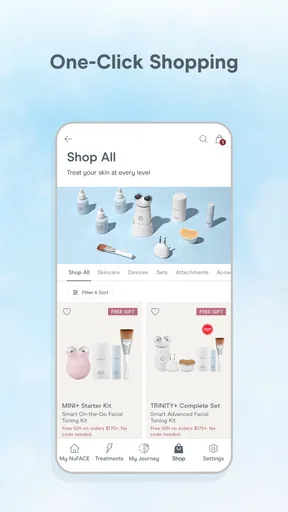
 Analysis by AppCompare
Using a beauty routine app in a shared home raises a practical question: is it useful when the phone, bathroom, or even the device is part of someone else’s routine too? I see NuFACE as a companion for people who already use the brand’s facial-toning devices and want guided sessions in one place. It is a free beauty app from NuFACE, with an average rating of 4.2 from 779 ratings and over 50,000 installs. Those figures suggest it has found an audience, but the more important test is whether its guidance fits the way you actually use a device at home.
A routine that can fit around a busy household
Picture a weekday evening: one person has a few minutes before getting ready for bed, while another needs the bathroom soon after. The app’s guided routines can help the first person follow a session without having to remember each step or improvise from memory. That is a modest but useful advantage in a busy household, where a routine is more likely to stick if it feels straightforward and contained.
Shared use works best when each person treats the routine as their own rather than assuming the app will coordinate everyone automatically. I would agree on who is using the device and when, and keep personal skincare products and accessories separate where appropriate. A shared phone can display guidance, but it does not replace good communication about the device itself or about whose routine is being followed.
The app is most appealing to someone who already has a compatible NuFACE device, appreciates visual guidance, and wants a repeatable facial-toning habit. It is less compelling if you only want general skincare reading, prefer to choose every step without prompts, or do not use the brand’s devices. In those cases, a skincare journal or a general routine tracker may suit you better; neither should be mistaken for a substitute for device-specific instructions.
Keep setup and personal routines distinct
The initial setup is simple, but I would take a moment to make sure the account and device pairing reflect the person who will actually use the routine. If several people take turns on one phone, avoid treating one person’s preferences, goals, or progress as a shared household profile. Keeping those boundaries clear makes the guidance more relevant and reduces the chance of one person accidentally following another person’s plan.
One useful habit is to check the selected routine before starting, especially after someone else has used the phone. That small pause is more reliable than assuming the app has switched context for you. I would also keep the phone nearby and ready before applying anything or picking up the device; fumbling through setup mid-session can interrupt the flow and make a short treatment feel like a chore.
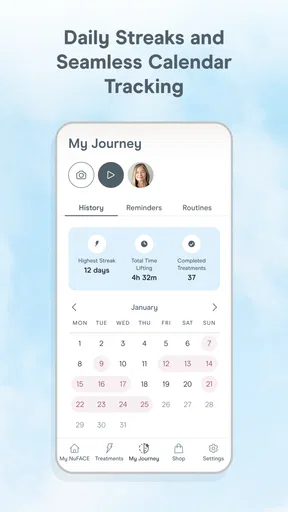
For someone who wants a private record of their own consistency, the tracking can give a routine a sense of continuity. But I would treat it as a personal aid, not as a shared scoreboard or a clinical assessment of skin changes. If you are comparing progress, use consistent lighting and ordinary observations rather than expecting an app record to explain every change. Skin can look different from day to day for many reasons, and routine tracking alone cannot establish why.
Worth Reading Before You Choose

EA SPORTS FC Mobile 26 Is a Bigger Football Game, but It Takes Time

Flipboard Shows What News Apps Must Do Beyond the Feed

Switching to Android Auto Means Rethinking Your Driving Routine

Google Calendar Makes a Crowded Week Easier to Manage

Ludo King Makes the Most of the Minutes Between Plans

Baby Panda World Brings Quick Play to Modern Phones, but Its Game Library Feels Busy
Coordination, age, and sensible expectations
There is no need to turn a shared routine into a complicated household system. A simple agreement about timing, device care, and whose session is next is usually more useful than expecting an app to manage handoffs. Reminders may help one person remember their own routine, but they should not be treated as a family scheduling feature. If two people want separate routines, they should check that the right account and preferences are in use before each session.
The app is rated for Everyone, which describes its content rating rather than making it a recommendation for every age or every skin concern. I would have an adult make the decision about whether a device-based beauty routine is appropriate for a younger household member, and follow the device’s own directions. The app’s prompts can make a routine easier to follow, but they are not a replacement for professional advice when someone has a specific skin concern or is unsure whether a treatment is suitable.
Compared with watching a general beauty video, the app’s main advantage is its connection to NuFACE routines and device guidance. Compared with a paper checklist, it can make following steps feel more interactive and help keep track of a habit. The trade-off is that it is a narrower choice: it is not a universal skincare library, and its usefulness depends on having the relevant device and wanting this guided style. If you prefer flexible, brand-neutral advice, a general skincare resource may be a better starting point.
Who will get the most from it?
I would recommend trying it if you already own a NuFACE device, are new to facial toning, or tend to lose momentum when a routine has too many steps to remember. A beginner can benefit from seeing the sequence while using the device, while an experienced user may value having routines and progress in one place. It can also suit someone who likes a gentle reminder to make a beauty habit more regular, provided reminders feel helpful rather than nagging.
I would skip it if you do not plan to use a NuFACE device, want a broad source of skincare education, or expect an app to determine whether a treatment is right for a particular condition. It is also not the best fit for someone who dislikes guided routines or does not want to create or manage an account. The app can organize a device-led session, but the decision to use the device and the care taken during a routine remain yours.
NuFACE is free, carries an Everyone content rating, and its current version is 4.4.3. It was released on July 24, 2022, and requires Android 10 or later on Android devices. Those details make it easy to judge basic access, but they do not change the core consideration: the experience is most worthwhile when the app supports a device and routine you already intend to use.
Getting Started with NuFACE
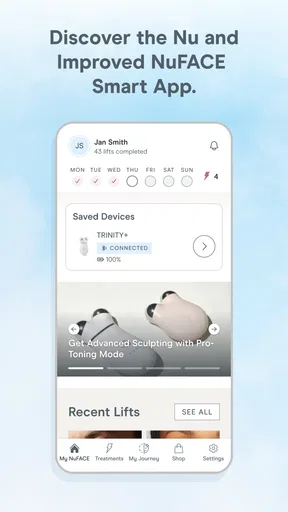
First things first, the setup process is pretty intuitive. All you need to do is download the app from the App Store or Google Play, sign up, and sync it with your device. The app guides you through each step with clear instructions, making it nearly foolproof. I was up and running in a matter of minutes.
Features That Shine
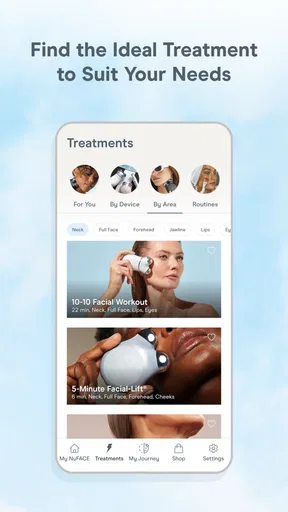
The app's interface is sleek and easy on the eyes, which makes navigating through its features a breeze. One of the standout features is the customizable facial routines. You can choose from a variety of treatments ranging from quick five-minute routines to more comprehensive sessions. It’s like having a personal beauty coach on your phone!
Another cool feature is the progress tracking. The app keeps tabs on your routines and results, allowing you to monitor how your skin improves over time. It even sends you reminders, which is perfect for someone like me who tends to forget to keep up with beauty treatments.
Let’s Talk Usability
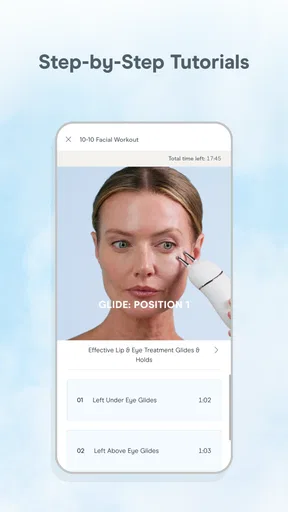
Using the app feels like having a beauty assistant. The guided routines are accompanied by clear visual aids and tips, ensuring you’re using your NuFACE device correctly. I found these guides extremely helpful, especially when I was new to the device.
One thing I really appreciate is how the app personalizes the experience based on your skin type and goals. It asks you a few questions and then recommends routines tailored just for you. This personalized touch makes each session feel more effective and engaging.
Room for Improvement?
While the app is generally great, there’s always room for a little improvement. For instance, I occasionally experienced minor lagging issues, especially when trying to sync my device. Although it wasn’t a dealbreaker, it did disrupt my routine a couple of times.
Also, while the app is packed with features, more educational content about skincare could be a nice addition. For newbies who might not be familiar with facial toning, a bit more information wouldn’t hurt.
Final Thoughts
Overall, the NuFACE app is a fantastic companion for anyone looking to take their skincare routine to the next level. It’s user-friendly, packed with helpful features, and genuinely makes the facial toning process more enjoyable. Despite a few minor hiccups, the app delivers on its promise to enhance your beauty regime.
So, if you’re already a fan of NuFACE devices or simply curious about starting your facial toning journey, this app is definitely worth a try. Just remember to keep your device charged and enjoy the glow-up!
Pros
- Easy-to-use interface for all users
- Effective for facial toning and contouring
- Portable design for on-the-go use
- App includes guided tutorials
- Customizable treatment settings
Cons
- Initial cost may be high
- Requires regular use for best results
- Not suitable for all skin types
- Battery life could be improved
- Limited customer support options
FAQs for NuFACE
What is NuFACE and how does it work?
NuFACE is a facial toning device that uses microcurrent technology to contour, tone, and firm the skin. It's designed to stimulate facial muscles, enhancing skin appearance by promoting cellular activity. Users typically notice improvements in facial contour, skin tone, and wrinkle reduction after consistent use. It’s akin to a workout for your facial muscles.
Is NuFACE safe for all skin types?
Yes, NuFACE is generally safe for all skin types. However, individuals with certain medical conditions, such as epilepsy, or those with electronic implants like pacemakers should exercise caution. It's always recommended to consult with a healthcare provider before starting any new skincare regimen, especially if you have specific skin concerns.
How often should I use the NuFACE device?
For optimal results, it's recommended to use the NuFACE device for at least five minutes per session, five days a week, during the initial 60-day period. After that, you can reduce usage to 2-3 times a week for maintenance. Consistency is key to achieving and maintaining results.
What are the main benefits of using NuFACE?
NuFACE offers several benefits, including improved facial contour, enhanced skin tone, and reduced appearance of fine lines and wrinkles. The microcurrent technology promotes collagen production, which contributes to firmer and more youthful-looking skin. Many users appreciate the non-invasive nature of the treatment compared to surgical options.
Do I need to use any specific products with NuFACE?
Yes, for the device to work effectively, it should be used with a conductive gel. NuFACE offers its own line of gels specifically formulated for use with their devices. These gels ensure optimal conductivity of the microcurrent and provide hydration benefits to the skin. Make sure to apply a generous amount before each session.


